


Order in 3 Easy Steps

Step 1
Shop with confidence at stores displaying the LnwPay symbol.
Step 2
Make payments easily through various methods, whether by bank transfer or online payment.

Step 3
Just wait a moment and your order will arrive safely. If there’s any issue, contact us for a refund.
How to Order
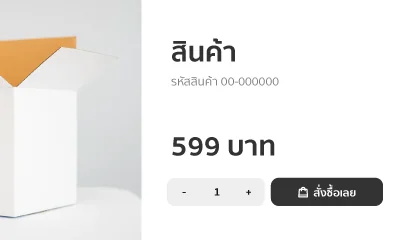
1. Choose the product you'd like to purchase on our website.
You can search for products using the button above or browse by category from the top menu of the website.
Once you find the product you want, click to add the product to your cart.
Once you find the product you want, click to add the product to your cart.
2. Review Your Cart and Place an Order
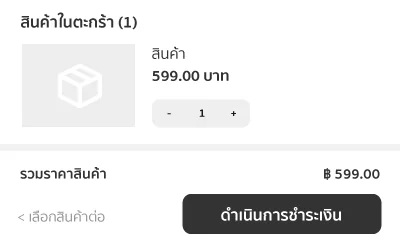
You can review the items in your cart by clicking the button at the top right corner.
Once you have reviewed the quantity and promotions, click to place your order. The system will take you to the order confirmation page.
Once you have reviewed the quantity and promotions, click to place your order. The system will take you to the order confirmation page.
3. Choose a Shipping Method and Enter Your Delivery Address
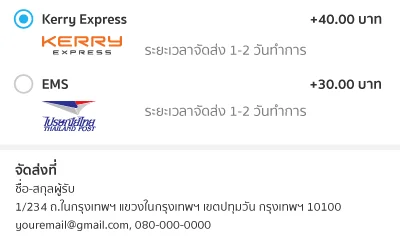
Select your preferred shipping method. The system will display the shipping fee and estimated delivery time.
Please enter the delivery address including the recipient's name, delivery address, and purchaser information so we can contact you when your order arrives.
Please enter the delivery address including the recipient's name, delivery address, and purchaser information so we can contact you when your order arrives.
4. Choose a Payment Method
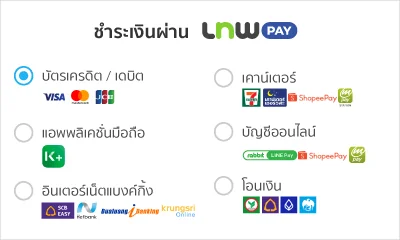
You can choose the payment method that is most convenient for you. We currently support 8 payment methods:
- Pay with Credit/Debit Card
- Scan QR
- Pay via Mobile Banking
- Pay via Internet Banking
- Up to 10-month installments
- Pay with Cash at Counter Service
- Pay via Online Account
- Bank Transfer
- Pay with Credit/Debit Card
- Scan QR
- Pay via Mobile Banking
- Pay via Internet Banking
- Up to 10-month installments
- Pay with Cash at Counter Service
- Pay via Online Account
- Bank Transfer
5. Review Information and Confirm Your Order
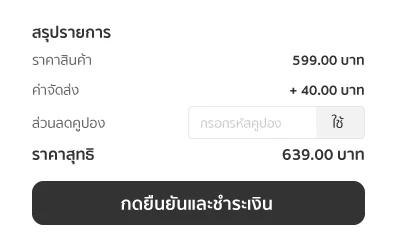
Please review all information on the order page again. If you have a discount coupon, you can enter it in this section. The system will update the final amount automatically. Once everything is correct, click to proceed with the payment.
6. Track Your Order Status
Your order has been placed successfully. The system will send an online invoice link to the email address you provided in step 3.
You can check your order status through this online invoice. Once your package has been shipped, you can also track the delivery status on the shipping provider's website.
You can track your order status and parcel tracking number at this link
You can check your order status through this online invoice. Once your package has been shipped, you can also track the delivery status on the shipping provider's website.
You can track your order status and parcel tracking number at this link
Payment Methods
Because this store uses the payment system via LnwPay, the recipient's name for all online payment channels, including the bank account name, will be registered under LNW Company Limited (the service provider of LnwPay). Please rest assured that you are making a payment to this store, and your purchase is protected by LnwPay.
Credit / Debit Card


Scan QR


Internet Banking





Up to 10-month installments


Online Account


Bank Transfer


How to check order status
- You can check your order status through the following channels:
- Via email After confirming your order, the system will send email notifications for every status update.
- Via the order page link You can return to check the status at any time.
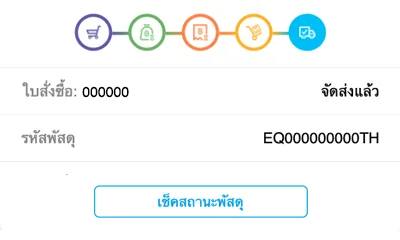
- The order detail page will display the status as follows:
 Waiting Payment You have successfully placed an order. Waiting for your payment. The system will show the due date and time before the order expires.
 Waiting for Payment Verification You have submitted your payment notification. Please wait for the LnwPay team to verify and respond within 24 hours.
 Waiting for Shipment Your payment has been completed. Waiting for the seller to ship the product via the selected delivery method.
 Waiting for Delivery The seller has shipped your order. Please wait to receive it at the address you provided.
 Waiting for Receipt Confirmation The system has detected that the product has been delivered. Please confirm receipt or report any issue.
 Completed The buyer has received and confirmed the order successfully.
 Expired The order has expired and can no longer be paid.
 Cancelled The order has been cancelled and no further actions can be taken.
 Refund Completed The LnwPay team has successfully refunded the buyer.